Friday, 19 October 2012

Riptide GP for Tegra 2 Devices


Description:

The premier console-quality water racing game for mobile.
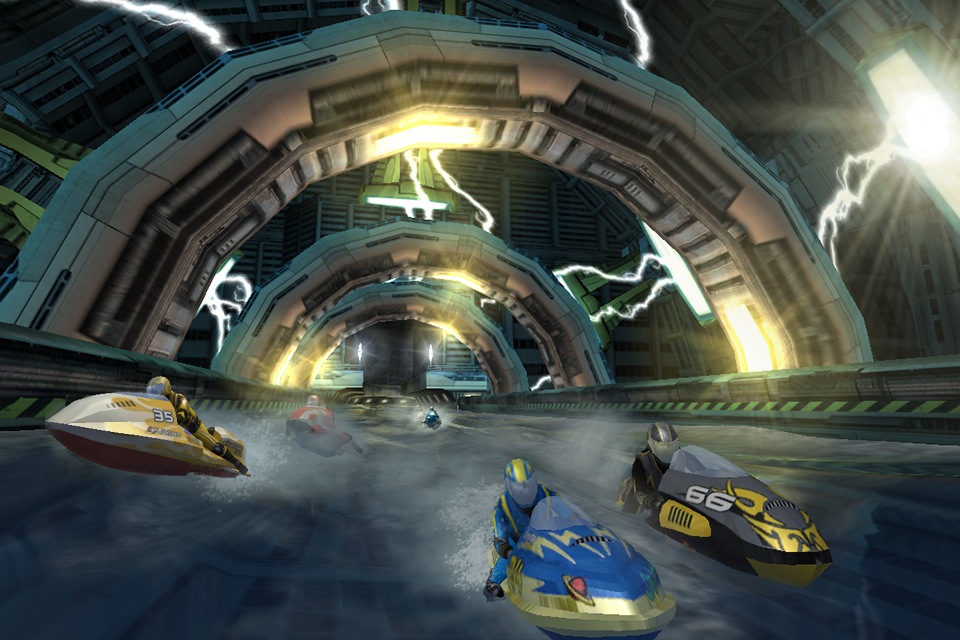
Riptide GP is the first ever console-quality water racing game for mobile, featuring super-realistic water physics, real-time reflections (dual core or higher), and gorgeous high-detail vehicles and environments.
Rev up your supercharged jet ski and take a wild ride through twisting canals and rivers, futuristic cityscapes, and mysterious research facilities. Skill, stunts, and speed will be your best allies as you grab massive air off huge waves, kick out death-defying tricks, and boost your jet ski to victory across a dynamic, ever-changing torrent of foam and spray.

WHAT THE REVIEWERS HAVE TO SAY:
"The age of console-quality Android gaming is upon us, and Riptide GP is one hell of a good start."
-- Kotaku
"It looks and sounds brilliant, and ... the tracks, unlockable craft, and wealth of modes should keep you on board for hours."
-- Pocket Gamer UK (8/10)
"If you enjoy racing games...this is a must have."
-- Droid Gamers (5/5)
"We haven’t been able to put it down. If you are looking for a mobile game with that 'wow factor' then look no further than this one."
-- Droid Life

FEATURES:
• Explore 12 futuristic water raceways
• Grab massive air and perform dramatic stunts to earn boost
• Unlock and master 6 screaming fast jet skis
• 3 game modes: Race, Hot Lap, and Championship
• MOGA Enhanced! MOGA controller is available at major US retailers and online at http://www.powera.com/moga
• Optimized for Xperia PLAY
• Bluetooth and USB gamepad support
• Earn Achievements, post to Leaderboards, and race against your Friends' best split times with integrated OpenFeint™ support
• Easy and fun to pick up and play – delightfully challenging to master
• Enhanced for quad-core devices! Extra-detailed waves, realistic water splashes on the camera, and a dramatic motion blur effect when boosting.

COMPATIBILITY NOTES:
Please note that Riptide GP is a processor intensive game, and requires a high-end smartphone or tablet (such as the Nexus 7) for optimal performance.
If you do encounter a problem running the game on your device, please email the device you're using, Android OS version, and a detailed description to support@vectorunit.com, instead of just leaving it in comments.  We actually respond to our support emails, and if we can't fix your problem we'll give you a refund. 

How to use:install the apk file and enjoy..!!

Link to Download:
http://www.4shared.com/android/XbYBxMHe/Riptide_Gp.html?

Friday, 12 October 2012

Download TSF Shell For Free


Description

TSF Shell 3D is an interface with brand new operating system.
Enable you to freely personalize various widgets to a full range. Let’s say goodbye to the traditional operation system.
Features:
Enable you to do multipule-operation, including auto-arragement, multipule-choices, add-to-folder, multipule-deleting, to the items by only one move of the finger. You can also check your folders in various ways.
TSF SHELL 3D has one app page and 4 personalized pages for our users. You can switch between pages by one click at the switch button in the lower left corner.
You can freely create one or more quicklinks for apps and drag them to any page. You can also distribute all the app icon (or even change their angles) freely in the personalized page.
The side column provides the most TSF Shell 3D charateristic widgets, including folders, contacts, music player, weather and so on.
The side column can be personalized as well, including changing the order and position of different catagories. You can create quicklinks of your most frequently used apps and contact in the quick launch in the side column.
TSF Shell 3D has a most powerful theme function. Apart from the difference in style, some themes even allow change in the transition animation.
Tips:
1. The folder where the application is less than 8, only to circle the icon into the folder.
2. The folder where the application is more than 8, only to drag the icon from the folder.


How To Use:Install The .apk and Touch The Icon(TSF Shell) On Your Menu And Enjoy... :)

Link To Download:
://www.4shared.com/android/aCCZugTe/TSF_Shell.html?

Saturday, 29 September 2012

Download Shine Runner For Free


Description

Smash and smuggle your way to redneck fame and glory!

"Shine Runner would be completely ridiculous if it weren't so amazing."
- Kotaku

"With high quality games such as these, Android's future in gaming looks bright."
- Droid Gamers

"What really makes Shine Runner so much fun is the fully-destructive environment. You can literally destroy anything and everything that gets in your path."
- Android Police

"A high flying, moonshine money making, backwoods bayou bonanza."
- Android Guys

Throw your flat-bottomed fanboat into high gear and slip and slide through the muddy waters of the backwoods bayou. Smash and crash through a destructible world filled with rickety swamp shacks, fishin’ boats, chicken coops, gators, and more. Pack your cargo hold to the brim with moonshine, tobacky, snake oil and other contraband and then sell ‘em to the highest bidder in a rampagin’ 10-day race for profit and glory. Just make sure you keep an eye out for Smokey–the more notorious you get, the more cops will come gunnin’ for you.

From the same team that brought you critically acclaimed jet ski racer Riptide GP!

---------
FEATURES:
---------

AMAZING BOAT PHYSICS
Power slide through twisting rivers with the most realistic boat physics ever seen on mobile.

COMPLETELY DESTRUCTIBLE ENVIRONMENTS
Crash through docks stacked high with barrels. Demolish shacks and outhouses. Punt gators and chickens. If you can see it, you can smash it!

SMUGGLE YOUR WAY TO RICHES!
Buy and sell contraband goods like Moonshine and Tobacky, smuggling them from one colorful locale to the next in a race for maximum profit.

ENHANCED FOR TEGRA 3!
Shine Runner sprays on the awesome-sauce thanks to the quad core goodness of NVIDIA's Tegra 3 superchip: Super-detailed water and on-camera splash effects, exclusively for Tegra 3 devices!

GORGEOUS HD VISUALS
Explore a colorful southern world filled with high-detail boats, animated characters, beautiful bayou, marsh, and mountain environments, all running at a silky smooth framerate on your smartphone or tablet – or on your HDTV with HDMI out.

GAMEPAD SUPPORT
In addition to tilt/touch controls, you can play using your Bluetooth/USB gamepad or XPeria Play slide-out controller.

OPENFEINT™ SUPPORTED
Make your name in the Shine Runner Hall of Fame leaderboards or show off your skills with some of the wackiest, most inventive Achievements around.

How To Use:Install The Apk And Play

Link To Download:
http://www.4shared.com/android/5ZvewAIh/Shine_Runner.html

Wednesday, 19 September 2012

Download Granny Smith For Free


Description

Catch the apple thief!

From the makers of Sprinkle!

"Mediocre is proving themselves the Pixar of the mobile gaming scene, and has once again, hit one out of the ballpark." [Phandroid]

"Gaming app of the day" [Kotaku]

"Another great looking release from the Sprinkle crew, one that provides hours of entertainment without a steep learning curve" [JayIsGames]

Granny Smith loves her apples, but a bewheeled thief is stealing from her precious garden! Help Mrs. Smith as she swiftly skates through farmland and cityscapes, crashing through everything from barns to offices in the pursuit of fruit. Get to the apples before the thief does!

Granny Smith is a fast-paced racing platformer filled with spectacular crashes and amazing stunts. Jump, glide, swing and smash your way through 36 hand-crafted levels in three distinct settings. Just be sure to land on your feet!

Features:

* Spectacular physics – Granny Smith uses some of the most advanced destruction physics in mobile games. Crash through crates and windows and watch the pieces fly all over!

* Dazzling visuals – Zoom through dozens of vibrant, whimsical worlds! Each level is like a fanciful, three-dimensional storybook.

* Intuitive controls – Help Granny pull off crazy moves with simple two-button controls – perfect for both tablets and phones.

* Vintage replays – Watch your best runs in retro movie style with cool camera angles and slow-motion effects!

* Power Granny up – Collect coins and equip Granny with a helmet, banana peels and baseballs. If Granny is getting old, you have two alternative characters to play with – Scruffy and Stanley!

* Additional breakable objects, grass, flowers and dust particles on NVIDIA Tegra 3 devices.

With the apple thief on the loose, Granny is going to need some help. Hop to it!


How To Use:Install The Apk and Play...Enjoy

Link To Download:
http://www.4shared.com/android/n0bNonH3/Granny_Smith.html

Sunday, 9 September 2012

Root Htc Explorer


Have an HTC EXPLORER?Always thought of playing high definition games or installing custom ROMs on your Smartphone....It is possible by rooting your smartphone but dont know how then you have chosen the right blog.Below are the Steps that will teach you how to root your HTC EXPLORER and find out what the smartphone is capable of.
Before rooting ur smartphone we recommend that you backup all your data.
(Note:Rooting voids your warranty and if your phone gets bricked than we are not responsible so proceed at your own risk)
Before rooting please make sure you have done the following.
1.)Unlock the bootloader of your smartphone.Visit htcdev.com and select "All Supported Models"and follow the steps as shown on the site.
2.)Install the latest version of htc sync and you can get it from HTC's website.
3.)You have charged your phone upto 60% so that your smartphone does not shut down between the rooting process.
If you have done all of the above steps then you can proceed further.
THINGS REQUIRED:
1.)Custom Recovery:
Link to download:
http://www.4shared.com/zip/MHKcaeLK/A310E_Recovery.html
2.)SuperUser:
Link to download:
http://www.4shared.com/zip/nEzEgulM/Superuser.html
INSTALLING CUSTOM RECOVERY ON HTC EXPLORER:
1.)Extract the custom recovery file on your desktop.
2.)Turn off your phone.
3.)Turn on your phone in bootloader mode by pressing the VOLUME DOWN BUTTON and POWER BUTTON together.
4.)Choose the fastboot option from the bootlader mode by pressing the power button and connect the phone to pc using the USB cable.
5.)Double click the "recovery.bat" file which you can find where you have extracted the custom recovery file.
6.)When the custom recovery has been successfully installed unplug your phone from pc.
7.)Reboot your phone.
Now you have successfully installed the custom recovery on your phone and now you can proceed with the roooting of your phone.This custom recovery allows you to install custom ROMs and SuperUser on your phone.
INSTALLING SUPERUSER ON HTC EXPLORER:
1.)Again boot your phone and connect it to your pc.
2.)Mout the SdCard and place the SuperUser file in your SdCard.
3.)Turn Off your phone and again restart it in bootloader mode by pressing the VOLUME DOWN BUTTON and POWER BUTTON together.
4.)In the bootloader mode you will see an option named recovery select it by pressing the power button.
5.)When your phone is booted in recovery mode select the option install .zip from sdcard and select the SuperUser.zip file.When the file is installed you may now reboot your phone.
If you are able to see SuperUser icon in your menu then congratulations you have successfully rooted your HTC EXPLORER.

Now you may play any HD games or install custom ROMs on your smartphone.